



If you are using Trusted Oracle7 in DBMS MAC mode, your DBMS label must match the label at which you granted the object privilege or you must satisfy one of the following criteria:
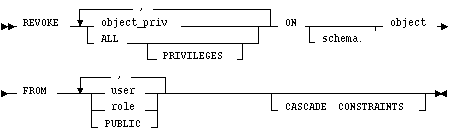
object_priv
is an object privilege to be revoked. You can substitute any of the following values:
ALL PRIVILEGES
revokes all object privileges that you have granted to the revokee.
ON
If you do not qualify object with schema, Oracle7 assumes the object is in your own schema.
FROM
identifies users and roles from which the object privileges are revoked.
PUBLIC revokes object privileges from all users.
CASCADE CONSTRAINTS
drops any referential integrity constraints that the revokee has defined using REFERENCES privilege that you are now revoking. You must specify this option along with the REFERENCES privilege or the ALL PRIVILEGES option if the revokee has exercised the REFERENCES privilege to define a referential integrity constraint.
If you revoke a privilege from a user: Oracle7 removes the privilege from the user's privilege domain. Effective immediately, the user cannot exercise the privilege.
If you revoke a privilege from a role: Oracle7 removes the privilege from the role's privilege domain. Effective immediately, users with the role enabled cannot exercise the privilege. Other users who have been granted the role cannot exercise the privilege after enabling the role.
If you revoke a privilege from PUBLIC: Oracle7 removes the privilege from the privilege domain of each user who has been granted the privilege through PUBLIC. Effective immediately, all such users are restricted from exercising the privilege. Note that the privilege is not revoked from users who have been granted the privilege directly or through roles.
You can only use the REVOKE command to revoke object privileges that you previously granted directly to the revokee. You cannot use the REVOKE command to perform the following operations:
GRANT ALL
ON bonus
TO pedro
To revoke DELETE privilege on BONUS from PEDRO, issue the following statement:
REVOKE DELETE
ON bonus
FROM pedro
To revoke the remaining privileges on BONUS that you granted to PEDRO, issue the following statement:
REVOKE ALL
ON bonus
FROM pedro
Example II
You can grant SELECT and UPDATE privileges on the view REPORTS to all users by granting the privileges to the role PUBLIC:
GRANT SELECT, UPDATE
ON reports
TO public
The following statement revokes UPDATE privilege on REPORTS from all users:
REVOKE UPDATE
ON reports
FROM public
Users can no longer update the REPORTS view, although users can still query it. However, if you have also granted UPDATE privilege on REPORTS to any users (either directly or through roles), these users retain the privilege.
Example III
You can grant the user BLAKE SELECT privilege on the ESEQ sequence in the schema ELLY with the following statement:
GRANT SELECT
ON elly.eseq
TO blake
To revoke SELECT privilege on ESEQ from BLAKE, issue the following statement:
REVOKE SELECT
ON elly.eseq
FROM blake
However, if the user ELLY has also granted SELECT privilege on ESEQ to BLAKE, BLAKE can still use ESEQ by virtue of ELLY's grant.
Example IV
You can grant BLAKE the privileges REFERENCES and UPDATE on the EMP table in the schema SCOTT with the following statement:
GRANT REFERENCES, UPDATE
ON scott.emp
TO blake
BLAKE can exercise the REFERENCES privilege to define a constraint in his own DEPENDENT table that refers to the EMP table in the schema SCOTT:
CREATE TABLE dependent
(dependno NUMBER,
dependname VARCHAR2(10),
employee NUMBER
CONSTRAINT in_emp REFERENCES scott.emp(ename) )
You can revoke REFERENCES privilege on SCOTT.EMP from BLAKE, by issuing the following statement that contains the CASCADE CONSTRAINTS option:
REVOKE REFERENCES
ON scott.emp
FROM blake
CASCADE CONSTRAINTS
Revoking BLAKE's REFERENCES privilege on SCOTT.EMP causes Oracle7 to drop the IN_EMP constraint because BLAKE required the privilege to define the constraint.
However, if BLAKE has also been granted REFERENCES privilege on SCOTT.EMP by a user other than you, Oracle7 does not drop the constraint. BLAKE still has the privilege necessary for the constraint by virtue of the other user's grant.
![[*]](jump.gif) REVOKE (System Privileges and Roles) command
REVOKE (System Privileges and Roles) command