



To manually roll back an in-doubt distributed transaction that you originally committed, you must have FORCE TRANSACTION system privilege. To manually roll back an in-doubt distributed transaction originally committed by another user, you must have FORCE ANY TRANSACTION system privilege.
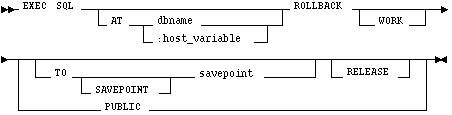
AT
db_name is a database identifier declared in a previous DECLARE DATABASE statement.
:host_variable is a host variable whose value is a previously declared db_name.
If you omit this clause, the statement is issued to your default database.
WORK
is optional and has no effect on ROLLBACK.
TO
rolls back the transaction to a previously declared savepoint.
RELEASE
releases all resources and disconnects you from the database.
FORCE
manually rolls back an in-doubt distributed transaction. The transaction is identified by the 'text' containing its local or global transaction ID. To find the IDs of such transactions, query the data dictionary view DBA_2PC_PENDING.
Oracle7 automatically rolls back your current transaction if the program terminates abnormally.
The ROLLBACK command has no effect on the contents of the host variables or on the control flow of the program.
Example
This example illustrates the use of the embedded SQL ROLLBACK command:
EXEC SQL ROLLBACK TO SAVEPOINT point4
![[*]](jump.gif) DECLARE DATABASE command
ROLLBACK command
SAVEPOINT command
SET TRANSACTION command
DECLARE DATABASE command
ROLLBACK command
SAVEPOINT command
SET TRANSACTION command