



For you to select rows from the base tables of a view, the owner of the schema containing the view must have SELECT privilege on the base tables. Also, if the view is in a schema other than your own, you must have SELECT privilege on the view.
The SELECT ANY TABLE system privilege also allows you to select data from any table or any snapshot or any view's base table.
If you are using Trusted Oracle7 in DBMS MAC mode, your DBMS label must dominate the creation label of each queried table, view, or snapshot or you must have READUP system privileges.
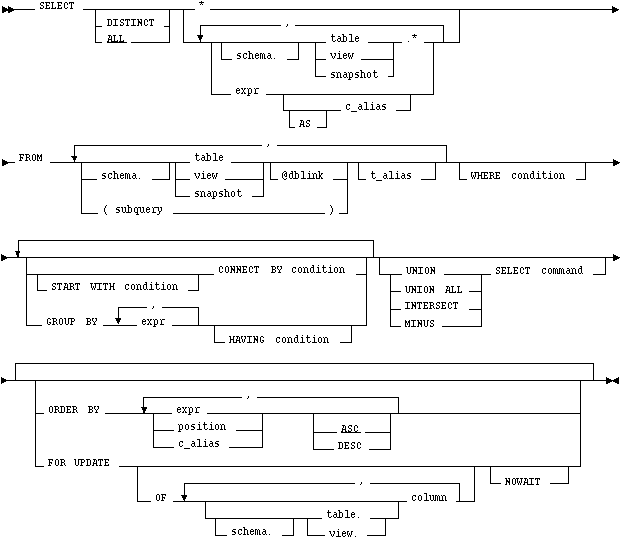
DISTINCT
ALL
returns all rows selected, including all copies of duplicates. The default is ALL.
*
selects all columns from all tables, views, or snapshots, listed in the FROM clause.
table.* view.* snapshot.*
selects all columns from the specified table, view, or snapshot. You can use the schema qualifier to select from a table, view, or snapshot in a schema other than your own.
If you are using Trusted Oracle, the * does not select the ROWLABEL column. To select this column, you must explicitly specify it in the select list.
expr
selects an expression. See the syntax description of expr ![[*]](jump.gif) . A column name in this list can only be qualified with schema if the table, view, or snapshot containing the column is qualified with schema in the FROM clause.
. A column name in this list can only be qualified with schema if the table, view, or snapshot containing the column is qualified with schema in the FROM clause.
c_alias
provides a different name for the column expression and causes the alias to be used in the column heading. The AS keyword is optional. The alias effectively renames the select list item for the duration of the query. The alias can be used in the ORDER BY clause, but not other clauses in the query.
schema
is the schema containing the selected table, view, or snapshot. If you omit schema, Oracle7 assumes the table, view, or snapshot is in your own schema.
table view snapshot
is the name of a table, view, or snapshot from which data is selected.
dblink
is the complete or partial name for a database link to a remote database where the table, view, or snapshot is located. For more information on referring to database links, see the section "Referring to Objects in Remote Databases" . Note that this database need not be an Oracle7 database.
If you omit dblink, Oracle7 assumes that the table, view, or snapshot is on the local database.
subquery
is a subquery that is treated in the same manner as a view. For the syntax of subquery, see . Oracle7 executes the subquery and then uses the resulting rows as a view in the FROM clause.
t_alias
provides a different name for the table, view, snapshot, or subquery for evaluating the query and is most often used in a correlated query. Other references to the table, view, or snapshot throughout the query must refer to the alias.
WHERE
START WITH CONNECT BY
returns rows in a hierarchical order.
GROUP BY
groups the selected rows based on the value of expr for each row and returns a single row of summary information for each group.
HAVING
See the syntax description of expr and the syntax description of condition .
UNION UNION ALL INTERSECT MINUS
combines the rows returned by two SELECT statement using a set operation. To reference a column, you must use an alias to name the column. The FOR UPDATE clause cannot be used with these set operators.
ORDER BY
orders rows returned by the statement.
expr orders rows based on their value for expr. The expression is based on columns in the select list or columns in the tables, views, or snapshots in the FROM clause.
position orders rows based on their value for the expression in this position of the select list.
ASC DESC specifies either ascending or descending order. ASC is the default.
FOR UPDATE
OF Only lock the select rows for a particular table in a join.
NOWAIT
If two or more tables have some column names in common, you must qualify column names with names of tables. Otherwise, fully qualified column names are optional, although it is always better to explicitly qualify table and column references. Oracle7 often does less work with fully qualified table and column names.
You can use a column alias, c_alias, to label the preceding expression in the select list so that the column is displayed with a new heading. The alias effectively renames the select list item for the duration of the query. The alias can be used in the ORDER BY clause, but not other clauses in the query.
If you use the DISTINCT option to return only a single copy of duplicate rows, the total number of bytes in all select list expressions is limited to the size of a data block minus some overhead. This size is specified by the initialization parameter DB_BLOCK_SIZE.
You can use comments in a SELECT statement to pass instructions, or hints, to the Oracle7 optimizer. The optimizer uses hints to choose an execution plan for the statement. For more information on hints, see Oracle7 Server Tuning.
Example I
The following statement selects rows from the employee table with the department number of 40:
SELECT *
FROM emp
WHERE deptno = 40
Example II
The following statement selects the name, job, salary and department number of all employees except salesmen from department number 30:
SELECT ename, job, sal, deptno
FROM emp
WHERE NOT (job = 'SALESMAN' AND deptno = 30)
Example III
The following statement selects from subqueries in the FROM clause and gives departments total employees and salaries as a percentage of all the departments:
SELECT a.deptno "Department",
       a.num_emp/b.total_count "%Employees",
       a.sal_sum/b.total_sal "%Salary"
  FROM
 (SELECT deptno, COUNT(*) num_emp, SUM(SAL) sal_sum
    FROM scott.emp
    GROUP BY deptno) a,
 (SELECT COUNT(*) total_count, SUM(sal) total_sal
    FROM scott.emp) b ;
START WITH
You can specify the root row(s) of the hierarchy using this clause.
CONNECT BY
You can specify the relationship between parent rows and child rows of the hierarchy using this clause.
WHERE
You can restrict the rows returned by the query without affecting other rows of the hierarchy using this clause.
Oracle7 uses the information from the above clause to form the hierarchy using the following steps:
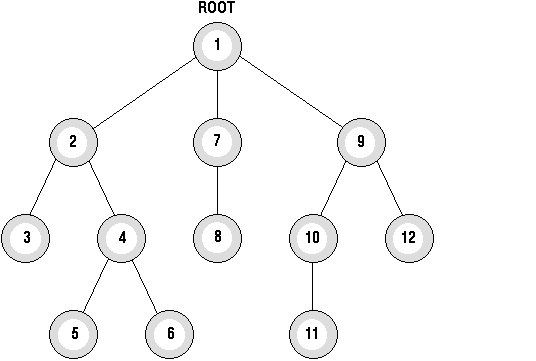 SELECT statements performing hierarchical queries are subject to the following restrictions:
; however, some part of the condition must use the PRIOR operator to refer to the parent row. The part of the condition containing the PRIOR operator must have one of the following forms:
PRIOR expr comparison_operator expr
expr comparison_operator PRIOR expr
To find the children of a parent row, Oracle7 evaluates the PRIOR expression for the parent row and the other expression for each row in the table. Rows for which the condition is true are the children of the parent. The CONNECT BY clause can contain other conditions to further filter the rows selected by the query. The CONNECT BY clause cannot contain a subquery.
If the CONNECT BY clause results in a loop in the hierarchy, Oracle7 returns an error. A loop occurs if one row is both the parent (or grandparent or direct ancestor) and a child (or a grandchild or a direct descendent) of another row.
Example IV
CONNECT BY PRIOR empno = mgr
Example V
In the following CONNECT BY clause, the PRIOR operator applies only to the EMPNO value. To evaluate this condition, Oracle7 evaluates EMPNO values for the parent row and MGR, SAL, and COMM values for the child row:
CONNECT BY PRIOR empno = mgr AND sal > comm
To qualify as a child row, a row must have a MGR value equal to the EMPNO value of the parent row and it must have a SAL value greater than its COMM value.
. The number of levels returned by a hierarchical query may be limited by available user memory.
Example VI
The following statement returns all employees in hierarchical order. The root row is defined to be the employee whose job is 'PRESIDENT'. The child rows of a parent row are defined to be those who have the employee number of the parent row as their manager number.
SELECT LPAD(' ',2*(LEVEL-1)) || ename org_chart,
		empno, mgr, job
	FROM emp
	START WITH job = 'PRESIDENT'
	CONNECT BY PRIOR empno = mgr

ORG_CHART         EMPNO        MGR JOB
------------ ---------- ---------- ---------
KING               7839            PRESIDENT
  JONES            7566       7839 MANAGER
    SCOTT          7788       7566 ANALYST
      ADAMS        7876       7788 CLERK
    FORD           7902       7566 ANALYST
      SMITH        7369       7902 CLERK
  BLAKE            7698       7839 MANAGER
    ALLEN          7499       7698 SALESMAN
    WARD           7521       7698 SALESMAN
    MARTIN         7654       7698 SALESMAN
    TURNER         7844       7698 SALESMAN
    JAMES          7900       7698 CLERK
  CLARK            7782       7839 MANAGER
    MILLER         7934       7782 CLERK
The following statement is similar to the previous one, except that it does not select employees with the job 'ANALYST'.
SELECT LPAD(' ',2*(LEVEL-1)) || ename org_chart,
		empno, mgr, job
	FROM emp
	WHERE job != 'ANALYST'
	START WITH job = 'PRESIDENT'
	CONNECT BY PRIOR empno = mgr

ORG_CHART          EMPNO        MGR JOB
------------- ---------- ---------- ---------
KING                7839            PRESIDENT
JONES               7566       7839 MANAGER
ADAMS               7876       7788 CLERK
SMITH               7369       7902 CLERK
BLAKE               7698       7839 MANAGER
ALLEN               7499       7698 SALESMAN
WARD                7521       7698 SALESMAN
MARTIN              7654       7698 SALESMAN
TURNER              7844       7698 SALESMAN
JAMES               7900       7698 CLERK
CLARK               7782       7839 MANAGER
Oracle7 does not return the analysts SCOTT and FORD, although it does return employees who are managed by SCOTT and FORD.
The following statement is similar to the first one, except that it uses the LEVEL pseudocolumn to select only the first two levels of the management hierarchy:
SELECT LPAD(' ',2*(LEVEL-1)) || ename org_chart,
empno, mgr, job
	FROM emp
	START WITH job = 'PRESIDENT'
	CONNECT BY PRIOR empno = mgr AND LEVEL <= 2

ORG_CHART         EMPNO        MGR JOB
------------ ---------- ---------- ---------
KING               7839            PRESIDENT
  JONES            7566       7839 MANAGER
  BLAKE            7698       7839 MANAGER
  CLARK            7782       7839 MANAGER
If a SELECT statement contains the GROUP BY clause, the select list can only contain the following types of expressions:
The total number of bytes in all expressions in the GROUP BY clause is limited to the size of a data block minus some overhead. This size is specified by the initialization parameter DB_BLOCK_SIZE.
Example VII
SELECT deptno, MIN(sal), MAX(sal)
	FROM emp
	GROUP BY deptno

    DEPTNO   MIN(SAL)   MAX(SAL)
---------- ---------- ----------
        10         10       5004
        20        804       3004
        30        954       2854
Example VIII
To return the minimum and maximum salaries for the clerks in each department, issue the following statement:
SELECT deptno, MIN(sal), MAX(sal)
	FROM emp
	WHERE job = 'CLERK'
 	GROUP BY deptno

    DEPTNO   MIN(SAL)   MAX(SAL)
---------- ---------- ----------
        10       1304       1304
        20        804       1104
        30        954        954
Example IX
To return the minimum and maximum salaries for the clerks in each department whose lowest salary is below $1,000, issue the following statement:
SELECT deptno, MIN(sal), MAX(sal)
	FROM emp
	WHERE job = 'CLERK'
	GROUP BY deptno
	HAVING MIN(sal) < 1000

    DEPTNO   MIN(SAL)   MAX(SAL)
---------- ---------- ----------
        20        804       1104
        30        954        954
. If more than two queries are combined with set operators, adjacent pairs of queries are evaluated from left to right. You can use parentheses to specify a different order of evaluation.
The total number of bytes in all select list expressions of a component query is limited to the size of a data block minus some overhead. The size of a data block is specified by the initialization parameter DB_BLOCK_SIZE.
You can specify multiple expressions in the ORDER BY clause. Oracle7 first sorts rows based on their values for the first expression. Rows with the same value for the first expression are then sorted based on their values for the second expression, and so on. Oracle7 sorts nulls following all others in ascending order and preceding all others in descending order.
Sorting by position is useful in the following cases:
The ORDER BY clause is subject to the following restrictions:
. If you use the ORDER BY clause in a hierarchical query, Oracle7 uses the ORDER BY clause rather than the hierarchy to order the rows.
Example X
SELECT *
	FROM emp
	WHERE job = 'SALESMAN'
	ORDER BY comm DESC
Example XI
SELECT ename, deptno, sal
	FROM emp
	ORDER BY deptno ASC, sal DESC
To select the same information as the previous SELECT and use the positional ORDER BY notation, issue the following statement:
SELECT ename, deptno, sal
	FROM emp
	ORDER BY 2 ASC, 3 DESC
The FOR UPDATE clause cannot be used with the following other constructs:
If a row selected for update is currently locked by another user, Oracle7 waits until the row is available, locks it, and then returns control to you. You can use the NOWAIT option to cause Oracle7 to terminate the statement without waiting if such a row is already locked.
Example XII
SELECT empno, sal, comm
	FROM emp, dept
	WHERE job = 'CLERK'
	  AND emp.deptno = dept.deptno
	  AND loc = 'NEW YORK'
	FOR UPDATE
Example XIII
SELECT empno, sal, comm
	FROM emp, dept
	WHERE job = 'CLERK'
	  AND emp.deptno = dept.deptno
	  AND loc = 'NEW YORK'
	FOR UPDATE OF emp
To execute a join of three or more tables, Oracle7 first joins two of the tables based on the join conditions comparing their columns and then joins the result to another table based on join conditions containing columns of the joined tables and the new table. Oracle7 continues this process until all tables are joined into the result. The optimizer determines the order in which Oracle7 joins tables based on the join conditions, indexes on the tables, and, in the case of the cost-based optimization approach, statistics for the tables.
In addition to join conditions, the WHERE clause of a join query can also contain other conditions that refer to columns of only one table. These conditions can further restrict the rows returned by the join query.
Example XIV
This equijoin returns the name and job of each employee and the number and name of the department in which the employee works:
SELECT ename, job, dept.deptno, dname
	FROM emp, dept
	WHERE emp.deptno = dept.deptno

ENAME      JOB       DEPTNO     DNAME
---------- --------- ---------- --------------
KING       PRESIDENT         10 ACCOUNTING
BLAKE      MANAGER           30 SALES
CLARK      MANAGER           10 ACCOUNTING
JONES      MANAGER           20 RESEARCH
FORD       ANALYST           20 RESEARCH
SMITH      CLERK             20 RESEARCH
ALLEN      SALESMAN          30 SALES
WARD       SALESMAN          30 SALES
MARTIN     SALESMAN          30 SALES
SCOTT      ANALYST           20 RESEARCH
TURNER     SALESMAN          30 SALES
ADAMS      CLERK             20 RESEARCH
JAMES      CLERK             30 SALES
MILLER     CLERK             10 ACCOUNTING
You must use a join to return this data because employee names and jobs are stored in a different table than department names. Oracle7 combines rows of the two tables according to this join condition:
emp.deptno = dept.deptno
Example XV
The following equijoin returns the name, job, department number, and department name of all clerks:
SELECT ename, job, dept.deptno, dname
	FROM emp, dept
	WHERE emp.deptno = dept.deptno
	  AND job = 'CLERK'

ENAME      JOB       DEPTNO     DNAME
---------- --------- ---------- --------------
SMITH      CLERK             20 RESEARCH
ADAMS      CLERK             20 RESEARCH
JAMES      CLERK             30 SALES
MILLER     CLERK             10 ACCOUNTING
This query is identical to Example XII except that it uses an additional WHERE clause condition to return only rows with a JOB value of 'CLERK':
job = 'CLERK'
Example XVI
This query uses a self join to returns the name of each employee along with the name of the employee's manager:
SELECT e1.ename||' works for '||e2.ename
"Employees and their Managers"
	FROM emp e1, emp e2 	WHERE e1.mgr = e2.empno

Employees and their Managers
-------------------------------
BLAKE works for KING
CLARK works for KING
JONES works for KING
FORD works for JONES
SMITH works for FORD
ALLEN works for BLAKE
WARD works for BLAKE
MARTIN works for BLAKE
SCOTT works for JONES
TURNER works for BLAKE
ADAMS works for SCOTT
JAMES works for BLAKE
MILLER works for CLARK
The join condition for this query uses the aliases E1 and E2 for the EMP table:
e1.mgr = e2.empno
This is the basic syntax of an outer join of two tables:
Outer join queries are subject to the following rules and restrictions:
In a query that performs outer joins of more than two pairs of tables, a single table can only be the NULL-generated table for one other table. For this reason, you cannot apply the (+) operator to columns of B in the join condition for A and B and the join condition for B and C.
Example XVII
This query uses an outer join to extend the results of Example XII:
SELECT ename, job, dept.deptno, dname
	FROM emp, dept
	WHERE emp.deptno (+) = dept.deptno

ENAME      JOB           DEPTNO DNAME
---------- --------- ---------- --------------
CLARK      MANAGER           10 ACCOUNTING
KING       PRESIDENT         10 ACCOUNTING
MILLER     CLERK             10 ACCOUNTING
SMITH      CLERK             20 RESEARCH
ADAMS      CLERK             20 RESEARCH
FORD       ANALYST           20 RESEARCH
SCOTT      ANALYST           20 RESEARCH
JONES      MANAGER           20 RESEARCH
ALLEN      SALESMAN          30 SALES
BLAKE      MANAGER           30 SALES
MARTIN     SALESMAN          30 SALES
JAMES      CLERK             30 SALES
TURNER     SALESMAN          30 SALES
WARD       SALESMAN          30 SALES
                             40 OPERATIONS
In this outer join, Oracle7 returns a row containing the OPERATIONS department even though no employees work in this department. Oracle7 returns NULL in the ENAME and JOB columns for this row. The join query in Example X only selects departments that have employees.
The following query uses an outer join to extend the results of Example XV:
SELECT ename, job, dept.deptno, dname
	FROM emp, dept
	WHERE emp.deptno (+) = dept.deptno
	  AND job (+) = 'CLERK'

ENAME      JOB           DEPTNO DNAME
---------- --------- ---------- --------------
MILLER     CLERK             10 ACCOUNTING
SMITH      CLERK             20 RESEARCH
ADAMS      CLERK             20 RESEARCH
JAMES      CLERK             30 SALES
                             40 OPERATIONS
In this outer join, Oracle7 returns a row containing the OPERATIONS department even though no clerks work in this department. The (+) operator on the JOB column ensures that rows for which the JOB column is NULL are also returned. If this (+) were omitted, the row containing the OPERATIONS department would not be returned because its JOB value is not 'CLERK'.
Example XVIII
This example shows four outer join queries on the CUSTOMERS, ORDERS, LINEITEMS, and PARTS tables. These tables are shown here:
SELECT custno, custname
	FROM customers

CUSTNO     CUSTNAME
---------- --------------------
1          Angelic Co.
2          Believable Co.
3          Cabels R Us
SELECT orderno, custno,
	TO_CHAR(orderdate, 'MON-DD-YYYY') "ORDERDATE"
	FROM orders

ORDERNO    CUSTNO     ORDERDATE
---------- ---------- -----------
9001       1          OCT-13-1993
9002       2          OCT-13-1993
9003       1          OCT-20-1993
9004       1          OCT-27-1993
9005       2          OCT-31-1993
SELECT orderno, lineno, partno, quantity
	FROM lineitems

ORDERNO        LINENO     PARTNO   QUANTITY
---------- ---------- ---------- ----------
      9001          1        101         15
      9001          2        102         10
      9002          1        101         25
      9002          2        103         50
      9003          1        101         15
      9004          1        102         10
      9004          2        103         20
SELECT partno, partname
	FROM parts

PARTNO PARTNAME
------ --------
   101 X-Ray Screen
   102 Yellow Bag
   103 Zoot Suit
Note that the customer Cables R Us have placed no orders and that order number 9005 has no line items.
The following outer join returns all customers and the dates they placed orders. The (+) operator ensures that customers who placed no orders are also returned:
SELECT custname, TO_CHAR(orderdate, 'MON-DD-YYYY') "ORDERDATE"
FROM customers, orders
WHERE customers.custno = orders.custno (+)
CUSTNAME ORDERDATE
-------------------- --------------
Angelic Co. OCT-13-1993
Angelic Co. OCT-20-1993
Angelic Co. OCT-27-1993
Believable Co. OCT-13-1993
Believable Co. OCT-31-1993
Cables R Us
The following outer join builds on the result of the previous one by adding the LINEITEMS table to the FROM clause, columns from this table to the select list, and a join condition joining this table to the ORDERS table to the WHERE clause. This query joins the results of the previous query to the LINEITEMS table and returns all customers, the dates they placed orders, and the part number and quantity of each part they ordered. The first (+) operator serves the same purpose as in the previous query. The second (+) operator ensures that orders with no line items are also returned:
SELECT custname,
TO_CHAR(orderdate, 'MON-DD-YYYY') "ORDERDATE",
partno,
quantity
	FROM customers, orders, lineitems
	WHERE customers.custno = orders.custno (+)
	  AND orders.orderno = lineitems.orderno (+)

CUSTNAME             ORDERDATE          PARTNO   QUANTITY
-------------------- -------------- ---------- ----------
Angelic Co.          OCT-13-1993           101         15
Angelic Co.          OCT-13-1993           102         10
Angelic Co.          OCT-20-1993           101         15
Angelic Co.          OCT-27-1993           102         10
Angelic Co.          OCT-27-1993           103         20
Believable Co.       OCT-13-1993           101         25
Believable Co.       OCT-13-1993           103         50
Believable Co.       OCT-31-1993
Cables R Us
The following outer join builds on the result of the previous one by adding the PARTS table to the FROM clause, the PARTNAME column from this table to the select list, and a join condition joining this table to the LINEITEMS table to the WHERE clause. This query joins the results of the previous query to the PARTS table to return all customers, the dates they placed orders, and the quantity and name of each part they ordered. The first two (+) operators serve the same purposes as in the previous query. The third (+) operator ensures that rows with NULL part numbers are also returned:
SELECT custname, TO_CHAR(orderdate, 'MON-DD-YYYY') "ORDERDATE",
	quantity, partname
	FROM customers, orders, lineitems, parts
	WHERE customers.custno = orders.custno (+)
	  AND orders.orderno = lineitems.orderno (+)
	  AND lineitems.partno = parts.partno (+)

CUSTNAME             ORDERDATE        QUANTITY PARTNAME
-------------------- -------------- ---------- ------------
Angelic Co.          OCT-13-1993            15 X-Ray Screen
Angelic Co.          OCT-13-1993            10 Yellow Bag
Angelic Co.          OCT-20-1993            15 X-Ray Screen
Angelic Co.          OCT-27-1993            10 Yellow Bag
Angelic Co.          OCT-27-1993            20 Zoot Suit
Believable Co.       OCT-13-1993            25 X-Ray Screen
Believable Co.       OCT-13-1993            50 Zoot Suit
Believable Co.       OCT-31-1993
Cables R Us
This is the syntax for a subquery: 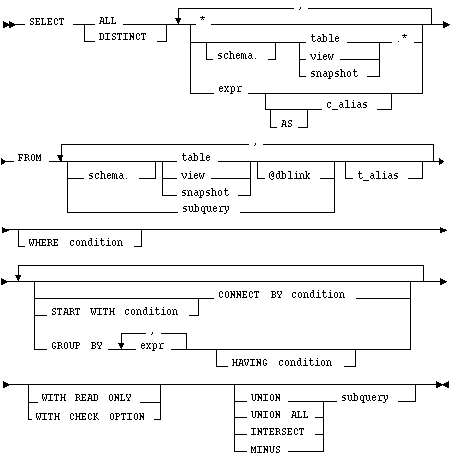
WITH READ ONLY
specifies that the subquery cannot be updated.
WITH CHECK OPTION
specifies that, if the subquery is used in place of a table in an INSERT, UPDATE, or DELETE statement, changes to that table that would produce rows excluded from the subquery are prohibited. In other words, the following statement: INSERT INTO (SELECT ename, deptno FROM Emp WHERE deptno < 10) VALUES ('Taylor', 20); would be legal, but INSERT INTO (SELECT ename, deptno FROM Emp WHERE deptno < 10 WITH CHECK OPTION) VALUES ('Taylor', 20); would be rejected.
Other keywords and parameters are as outlined after the SELECT syntax diagram in the beginning of this entry.
A subquery is evaluated once for the entire parent statement, in contrast to a correlated subquery which is evaluated once per row processed by the parent statement.
A subquery can itself contain a subquery. Oracle7 places no limit on the level of query nesting.
Example XIX
To determine who works in Taylor's department, issue the following statement:
SELECT ename, deptno
	FROM emp
	WHERE deptno =
		(SELECT deptno
			FROM emp
			WHERE ename = 'TAYLOR')
Example XX
To give all employees in the EMP table a ten percent raise if they have not already been issued a bonus (if they do not appear in the BONUS table), issue the following statement:
UPDATE emp
	SET sal = sal * 1.1
 	WHERE empno NOT IN (SELECT empno FROM bonus)
Example XXI
To create a duplicate of the DEPT table named NEWDEPT, issue the following statement:
CREATE TABLE newdept (deptno, dname, loc)
	AS SELECT deptno, dname, loc FROM dept
SELECT select_list
	FROM table1 t_alias1
	WHERE expr operator
		(SELECT column_list
			FROM table2 t_alias2
			WHERE t_alias1.column
			      operator t_alias2.column)
UPDATE table1 t_alias1
	SET column =
		(SELECT expr
			FROM table2 t_alias2
			WHERE t_alias1.column = t_alias2.column)
DELETE FROM table1 t_alias1
	WHERE column operator
		(SELECT expr
			FROM table2 t_alias2
			WHERE t_alias1.column = t_alias2.column)
This discussion focuses on correlated subqueries in SELECT statements, although it also applies to correlated subqueries in UPDATE and DELETE statements.
You can use a correlated subquery to answer a multi-part question whose answer depends on the value in each row processed by the parent statement. For example, a correlated subquery can be used to determine which employees earn more than the average salaries for their departments. In this case, the correlated subquery specifically computes the average salary for each department.
Oracle7 performs a correlated subquery when the subquery references a column from a table from the parent statement.
Oracle7 resolves unqualified columns in the subquery by looking in the tables of the subquery, then in the tables of the parent statement, then in the tables of the next enclosing parent statement, and so on. Oracle7 resolves all unqualified columns in the subquery to the same table. If the tables in a subquery and parent query contain a column with the same name, a reference to the column of a table from the parent query must be prefixed by the table name or alias. To make your statements easier for you to read, always qualify the columns in a correlated subquery with the table, view, or snapshot name or alias.
In the case of an UPDATE statement, you can use a correlated subquery to update rows in one table based on rows from another table. For example, you could use a correlated subquery to roll up four quarterly sales tables into a yearly sales table.
In the case of a DELETE statement, you can use a correlated query to delete only those rows that also exist in another table.
Example XXII
The following statement returns data about employees whose salaries exceed the averages for their departments. The following statement assigns an alias to EMP, the table containing the salary information, and then uses the alias in a correlated subquery:
SELECT deptno, ename, sal
FROM emp x
WHERE sal > (SELECT AVG(sal)
FROM emp
WHERE x.deptno = deptno)
ORDER BY deptno
For each row of the EMP table, the parent query uses the correlated subquery to compute the average salary for members of the same department. The correlated subquery performs these steps for each row of the EMP table:
Example XXIII
The following statement returns the current date:
SELECT SYSDATE FROM DUAL
You could select SYSDATE from the EMP table, but Oracle7 would return 14 rows of the same SYSDATE, one for every row of the EMP table. Selecting from DUAL is more convenient.
and the section "Pseudocolumns" . Example XXIV
The following statement increments the ZSEQ sequence and returns the new value:
SELECT zseq.nextval
FROM dual
The following statement selects the current value of ZSEQ:
SELECT zseq.currval
FROM dual
. Distributed queries are currently subject to this restriction all tables locked by a FOR UPDATE clause and all tables with LONG columns selected by the query must be located on the same database. For example, the following statement will cause an error:
SELECT emp_ny.*
	FROM emp_ny@ny, dept
	WHERE emp_ny.deptno = dept.deptno
	  AND dept.dname = 'ACCOUNTING'
	FOR UPDATE OF emp_ny.sal
Also, you cannot issue the above statement because it selects LONG_COLUMN, a LONG value, from the EMP_REVIEW table on the NY database and locks the EMP table on the local database:
SELECT emp.empno, review.long_column, emp.sal
	FROM emp, emp_review@ny review
	WHERE emp.empno = emp_review.empno
	FOR UPDATE OF emp.sal
Example XXV
This example shows a query which joins the DEPT table on the local database with the EMP table on the HOUSTON database:
SELECT ename, dname
FROM emp@houston, dept
WHERE emp.deptno = dept.deptno
SELECT (Embedded SQL) command
UPDATE command